The honest answer is: it depends, but not in a vague way. Three specific numbers determine it, your battery’s usable capacity, how much power your household actually draws, and whether solar is recharging the battery while it’s discharging. Once you know those three things, the runtime math is straightforward, and that’s exactly what this guide walks through, with real appliance numbers, real battery specs, and real installed costs.
This is also the fourth piece in our earthquake and outage preparedness series. If you haven’t read them yet, start with How to Prepare Your Home for a Major California Earthquake, What Happens if the Power Goes Out After an Earthquake?, and Can Solar Panels Still Work After an Earthquake?
What Determines How Long a Home Battery Lasts During an Outage?
Three factors, in order of importance:
- Usable capacity (kWh). This is the total amount of stored energy your battery holds, measured in kilowatt-hours. A 13.5 kWh battery holds 13.5 kilowatt-hours of usable stored energy, full stop.
- Your load (kW). This is the rate at which your home draws power at any given moment. A refrigerator, some lights, and a Wi-Fi router draw far less than a central air conditioner.
- Solar recharging. If solar panels are still generating during daylight hours of the outage, they can recharge the battery, extending total runtime well beyond what the battery’s capacity alone would suggest.
Runtime, in its simplest form, is capacity divided by load: a 13.5 kWh battery powering a continuous 1 kW load lasts about 13.5 hours. Powering a continuous 3 kW load, it lasts about 4.5 hours. The math doesn’t change, only the load does.
The Two Numbers That Actually Matter: kWh vs. kW
This distinction trips up more people than anything else in battery shopping. Kilowatt-hours (kWh) measure total stored energy, how much you have. Kilowatts (kW) measure the rate of power delivery, how fast you can use it, or how much you can run at once. A battery can have a large kWh rating and still struggle to start a single large appliance if its kW output rating is low. Both numbers matter, and a battery quote that only advertises one of them isn’t giving you the full picture.
Popular Home Battery Models, Side by Side
Three products dominate the current residential market. Specs below are pulled from each manufacturer’s own published data sheets.
| Battery | Usable Capacity | Continuous Output | Chemistry | Warranty |
|---|---|---|---|---|
| Tesla Powerwall 3 | 13.5 kWh | 11.5 kW | LFP | 10 years |
| FranklinWH aPower 2 | 15 kWh | 10 kW | LFP | 15 years |
| Enphase IQ Battery 5P | ~5 kWh (modular) | ~3.84 kW per unit | LFP | 15 years |
Notice that FranklinWH holds slightly more capacity per unit while Tesla delivers more continuous output, the kind of tradeoff that only matters once you know your own household’s load, which is exactly what the next section works through.
Real Numbers: How Long Different Loads Actually Run
Here’s what a single 13.5 kWh battery, fully charged with no solar recharging, delivers across four realistic load scenarios. These are illustrative averages, not a guarantee for any specific home.
| Load Scenario | Approx. Continuous Draw | Approx. Runtime |
|---|---|---|
| Critical loads only (fridge, lights, Wi-Fi, phone charging) | ~0.4 kW | ~30-34 hours |
| Critical loads + microwave use, CPAP | ~0.7 kW | ~18-20 hours |
| Partial home (add well pump, garage door) | ~1.5 kW | ~8-9 hours |
| Whole home with central AC running | ~3.5 kW | ~3.5-4 hours |
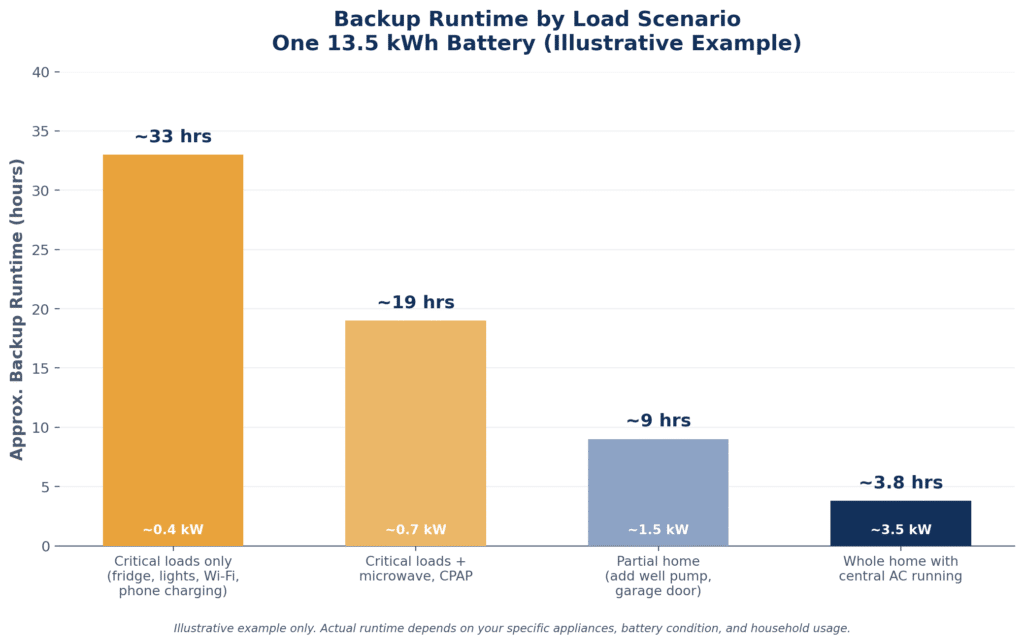
The pattern is consistent with what battery manufacturers themselves publish: a single battery covers essential loads for roughly a day, while whole-home backup including air conditioning typically requires two to three units stacked together, which is why sizing conversations always start with “what do you actually need to run,” not “how big a battery can I buy.”
Which Appliances Should Be Prioritized on Battery Backup?
Not everything in your home needs to be on the battery circuit. The U.S. Department of Energy’s appliance energy guidance, along with published wattage data from battery manufacturers, points to a fairly consistent priority order:
| Appliance | Typical Running Watts | Priority |
|---|---|---|
| Refrigerator | 150-400 W | Critical |
| LED lighting (several rooms) | 100-150 W | Critical |
| Wi-Fi router and modem | 20-25 W | Critical |
| Phone and laptop charging | 60-80 W | Critical |
| CPAP or medical equipment | 30-60 W | Critical |
| Sump or well pump | 800-1,500 W | Important, situational |
| Garage door opener | 500-1,000 W (briefly) | Important, situational |
| Microwave | 1,000-1,200 W | Comfort |
| Central air conditioning (3-ton) | 3,000-3,500 W running | Comfort, highest draw |
Refrigeration, lighting, communication, and any medical equipment come first on almost every household’s list. Central air conditioning and electric ranges use the most power for the least added safety benefit during a short outage, which is why they’re usually the first things left off a critical-loads plan and the main reason whole-home setups need more battery capacity.
Can a Battery Be Recharged by Solar During a Multi-Day Outage?
Yes, and this is the detail that changes everything for longer outages. A battery on its own is a fixed amount of stored energy, once it’s empty, it’s empty. Paired with solar, the battery recharges every day the sun is out, which means a well-designed solar-plus-battery system can theoretically run indefinitely on critical loads, cycling between daytime solar charging and overnight battery discharge, for as long as the outage lasts. This matters most for earthquake scenarios specifically, since aftershocks can trigger repeat outages over days or weeks rather than a single clean event. We cover why grid outages last as long as they do in What Happens if the Power Goes Out After an Earthquake?
How Is a Home Battery System Sized for My House?
Sizing comes down to two questions, answered in order:
- What do you want backed up? A critical-loads plan (fridge, lights, Wi-Fi, medical devices) needs far less capacity than a whole-home plan that includes HVAC.
- For how long? A single day of backup is a different sizing target than three to five days of expected autonomy, especially relevant in earthquake-prone areas where aftershocks can extend an outage well past the first 24 hours.
From there, the calculation is: add up the wattage of everything you want backed up, multiply by the hours you want to cover, add a buffer for inefficiency and battery degradation over time, and that total (in kWh) is your target capacity. A household aiming for 24 hours of critical-loads backup at roughly 0.4 kW average draw needs about 10 kWh of usable capacity, comfortably inside a single Tesla Powerwall 3 or FranklinWH aPower 2. A household wanting 3 days of whole-home backup at 2 kW average draw needs roughly 144 kWh, which is a multi-unit commercial-scale conversation, not a typical residential one. Most homeowners land somewhere between these two extremes, which is exactly why a personalized sizing conversation matters more than a generic rule of thumb.
What Does a Home Battery Backup System Cost?
According to EnergySage’s California-specific 2026 data, the average storage system cost in California is about $1,074 per kWh, putting a typical 13 kWh system between roughly $11,864 and $16,052 installed, averaging around $13,958. Nationally, EnergySage puts the average closer to $1,128 per kWh, or about $15,228 for a 13.5 kWh battery before incentives.
A few cost factors worth knowing:
- Equipment (the battery itself, plus any integrated inverter) typically makes up 50 to 60 percent of the total installed price.
- Labor, permitting, and any electrical panel upgrades make up most of the rest, and vary significantly by home and by city.
- As of this writing, there is no federal tax credit for standalone battery purchases, since the Residential Clean Energy Credit (Section 25D) expired December 31, 2025. Batteries charged by solar as part of a combined system may still qualify under different rules, confirm current eligibility with a tax professional before assuming either way.
- California-specific incentive programs, including SGIP equity tiers for qualifying households, can meaningfully reduce net cost, availability and amount depend on income tier and utility territory.
How Does HomeLink Solar Size a Battery System for My Specific Home?
HomeLink Solar (CSLB License #1117534) builds every battery recommendation around your actual usage, not a generic package tier. That means reviewing your utility bill history, walking through which circuits matter most to you specifically, medical equipment, well pumps, work-from-home setups, and sizing capacity to match, rather than defaulting to whatever unit happens to be in stock. Owner Mandy oversees every install personally, and every proposal includes the real math: usable kWh, continuous output, and an honest runtime estimate for your specific home, not an industry-average table like the one above.
FAQs
What determines how long a home battery lasts during an outage?
Three things: the battery’s usable capacity in kWh, the rate at which your home draws power (kW), and whether solar is recharging the battery during the outage. Runtime is roughly capacity divided by load, extended indefinitely if solar recharging keeps pace with daily use.
Which appliances should be prioritized on battery backup?
Refrigeration, lighting, Wi-Fi and communication devices, and any medical equipment come first. High-draw comfort appliances like central air conditioning and electric ranges use the most power for the least added safety benefit and are usually left off a critical-loads plan.
Can a battery be recharged by solar during a multi-day outage?
Yes. A solar-plus-battery system can recharge every daylight hour of an outage, which means critical loads can, in principle, run for as long as the outage lasts rather than being limited to a single battery charge.
How is a home battery system sized for my house?
Add up the wattage of everything you want backed up, decide how many hours or days of autonomy you want, and size total kWh capacity accordingly, with a buffer for inefficiency and battery degradation. Critical-loads plans typically need far less capacity than whole-home plans that include HVAC.
How does HomeLink Solar size a battery system for my specific home?
By reviewing actual utility bill history and the specific circuits that matter most to your household, rather than defaulting to a fixed package. Every proposal includes real usable kWh, continuous output, and a runtime estimate specific to your home.
Related Reading
This piece is part of our earthquake and outage preparedness series. See How to Prepare Your Home for a Major California Earthquake, What Happens if the Power Goes Out After an Earthquake?, and Can Solar Panels Still Work After an Earthquake? for the rest of the cluster.
Sources
- Tesla — Powerwall 3 official datasheet (13.5 kWh, 11.5 kW continuous output)
- FranklinWH — aPower 2 official product page (15 kWh, 10 kW continuous output)
- EnergySage — 2026 Cost of Energy Storage in California
- EnergySage — Your Guide to Home Batteries in 2026
- California Public Utilities Commission — Public Safety Power Shutoff FAQs
- U.S. Department of Energy — Energy Saver appliance and electronics guidance